CERA
CERA (Italian, "wax") — a Blender add-on for lost-wax bronze casting. It turns a solid sculpt into a hollow shell of even wall thickness, checks the shell against the thickness you asked for, and estimates what the bronze will weigh. The name is the wax in cera persa, the lost wax: the sculpture goes through a wax stage and the bronze takes its place.
One Python file, cera_hollow.py, run inside Blender. It declares Blender 4.0 or newer; everything on this page was tried in Blender 5.3.0 on 2026-11-19. It installs from Preferences ▸ Add-ons ▸ Install from Disk and lives in the 3D Viewport sidebar (N) under a CERA tab. There is no server and nothing leaves the machine.
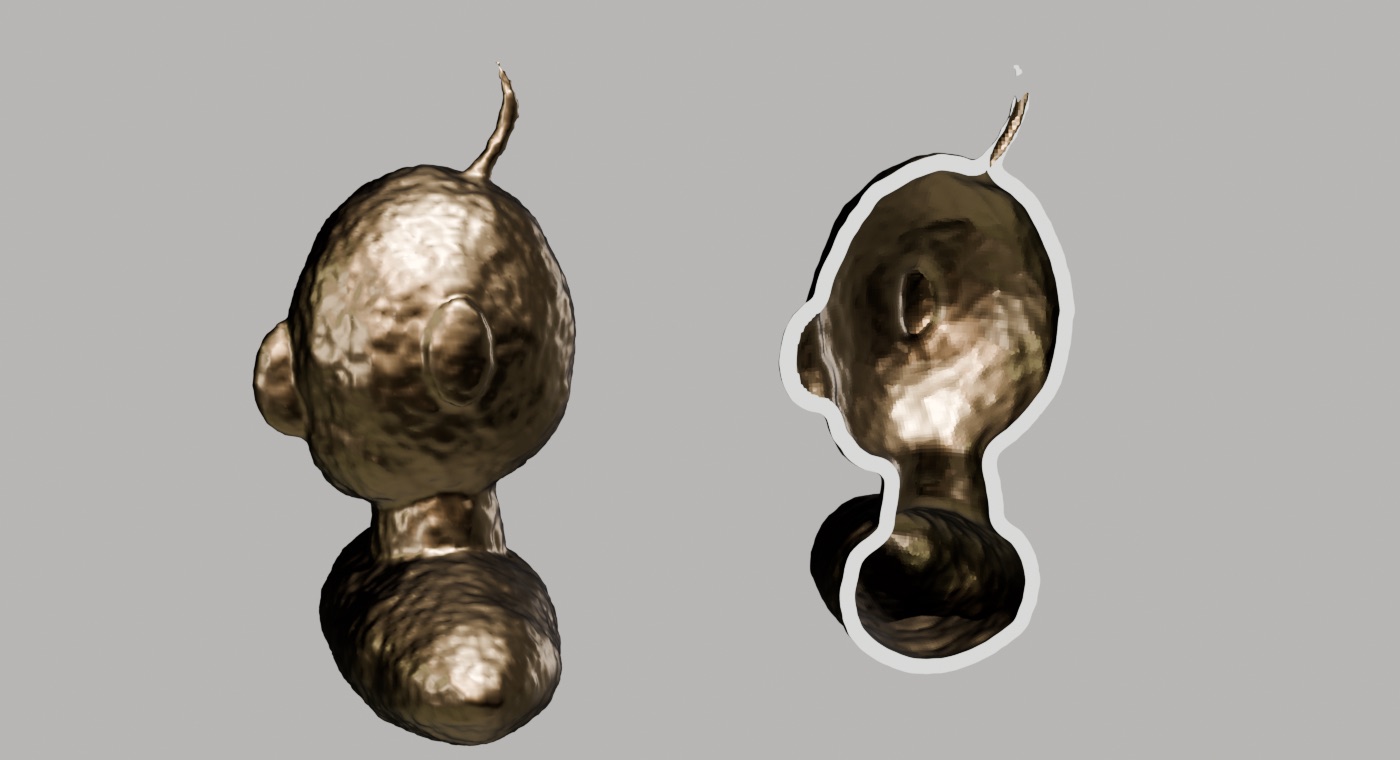
A test bust, about 165 mm tall, made for this page. Left: the solid sculpt. Right: CERA's shell at its defaults (4 mm wall), cut open down the middle on a copy so the wall shows; the pale band is the metal. Renders. The thin curl on top is there on purpose, to see what thin detail does.
Contents
Why hollow
A solid cast weighs what its volume says. The bust above is 406 cm³ solid, which at CERA's density is 3.6 kg of bronze; as a 4 mm shell it is 131 cm³, 1.2 kg. A thin even wall is the usual answer, and the thickness is a number to settle with your foundry. 4 mm is only CERA's default.
CERA's job is to put that wall on the digital sculpt so you can look at it, weigh it and send it on, before the foundry sees it.
The panel
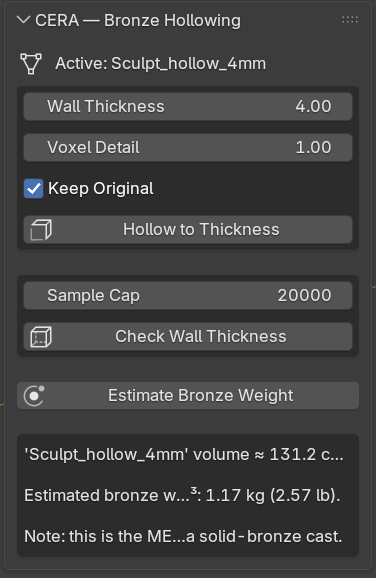
The CERA panel, Blender 5.3, after hollowing the test bust and pressing Estimate Bronze Weight. The report lines are cut off at the panel's width.
If the active object is not a mesh the panel says "Select a mesh object" and nothing else.
| control | what it does |
|---|---|
| Wall Thickness | the wall, in millimetres. Default 4, from 0.5 to 50. The field shows a bare number |
| Voxel Detail | the voxel size of the remesh, in millimetres. Default 1, from 0.1 to 20. Should be well under the wall; a quarter of it is the suggested start. If it is not smaller than the wall you get a warning, and the hollow runs anyway |
| Keep Original | on by default. The solid sculpt stays in the file, hidden in the viewport and in renders. Off, it is deleted |
| Hollow to Thickness | makes the shell |
| Sample Cap | how many faces the thickness check may use. Default 20,000, from 100 to 500,000 |
| Check Wall Thickness | measures the wall |
| Estimate Bronze Weight | weighs the mesh in bronze |
Millimetres are read through the scene's Unit Scale, so it holds whether one Blender unit is a metre or a millimetre.
Hollowing
Hollow to Thickness works on the active mesh and never touches it, apart from hiding or deleting it. It:
- copies the mesh and runs a voxel remesh on the copy, at Voxel Detail. This is the outer surface;
- copies that, moves every vertex inward along its normal by the wall thickness, and remeshes again. The second remesh is the point of the method: where the inward move made the surface fold through itself, treating it as one solid volume heals it;
- subtracts the inner copy from the outer with an exact Boolean, which leaves a shell with a closed cavity;
- hides the original, or deletes it with Keep Original off, selects the shell, and reports its volume in the status bar.
The result is named <name>_hollow_4mm. The "4mm" is written into the name whatever thickness you chose. Modifiers on the source are applied into the copy; the source keeps its own.
What to know before trusting it:
- The outer surface is a remesh, not your mesh. On the test bust, 95% of it stays within 0.1 mm of the sculpt at the default 1 mm voxel. Detail much finer than a few voxels does not survive: the curl on top tapers to under 2 mm, and the last 10 mm of it is gone, with a small fragment of the tip left floating above as a separate piece of the mesh (the speck in the picture). UV maps and colour attributes on the source are not carried over, and the shading comes out flat.
- Apply scale first. The offset is measured in the object's own units. A ball scaled to 2 came out with an 8 mm wall.
- The wall is even. Measured independently, from every outer vertex to the nearest point of the cavity, 90% of the test shell lies between 3.95 and 4.12 mm, median 4.02. Where the sculpt is too thin to hold a cavity the wall gives out: at the root of the curl the thinnest point was 0.96 mm.
- The cavity is closed. There is no hole in the shell. The add-on does not cut one.
- Finer voxels cost a lot. Blender is busy until it finishes.
| Voxel Detail | faces in the shell | time |
|---|---|---|
| 1.0 mm | about 98,000 | about 1 s |
| 0.5 mm | about 393,000 | about 3 s |
| 0.25 mm | about 1.6 million | about 25 s |
The same test bust at three voxel sizes, on one machine.
Checking the wall
Check Wall Thickness reads the active mesh as it is shown, modifiers included. For every Nth face, chosen so that about Sample Cap faces are used (every face when there are fewer; the sample can therefore run past the cap, to nearly twice it), it fires a ray from just under the face, straight inward along the face's normal, and takes the distance to the first surface it meets. On a hollow shell that distance is the wall. It reports in the panel and the status bar: faces sampled, the minimum, the 5th percentile, the average and the maximum, and how many samples fall under the target. If the minimum is under half the target it warns and names fingers, edges and undercuts.
Run it on the shell. On the solid sculpt the ray crosses the whole body, so what comes back is the thickness of the body, not of a wall.
It also paints a colour attribute on the mesh, CERA_thickness, from every vertex, not from the sample: red through yellow where the wall is under the target (red is thinnest, yellow is just under), green at the target or above, shading to cyan at twice the target, grey where a vertex's ray hit nothing. To see it, put Solid shading on and set Color to Attribute. If the mesh already has another colour attribute, CERA does not make its own the active one; pick it in Object Data properties. The attribute is added to your mesh and stays until you delete it.
What a ray cannot tell you:
- It measures along one face normal to the first surface it hits. Where a wall slopes or tapers that distance is longer than the wall's true thickness, so such places read thicker than they are.
- The numbers come from a sample; a face skipped is a face not measured. The colours do cover every vertex.
- Faces whose ray hits nothing are left out of the numbers. A mesh with holes gives fewer samples, and if none hit, the check stops with an error.
- It reports. It never thickens a wall.
Weight
Estimate Bronze Weight takes the enclosed volume of the active mesh, as stored (modifiers are not included; object scale and the scene's unit scale are), and multiplies it by 8.9 g/cm³. The panel shows cm³, then kilograms and pounds. The density is a constant in the file, with no field in the panel. A comment in the code gives silicon bronze, the usual statuary alloy, as about 8.75 to 8.85, and says 8.9 is chosen slightly heavy so the estimate is not light; leaded and tin bronzes run higher.
It counts the metal in the mesh and nothing else: no gates, runners or sprues. Run it on the shell. On the solid sculpt it answers for a solid cast, and the panel says so. Checked against a 100 mm ball by formula: 523.6 cm³ solid and 115.9 cm³ as a 4 mm shell; the add-on gave 522.7 and 115.9.
| test bust | volume | bronze at 8.9 g/cm³ |
|---|---|---|
| solid sculpt | 406 cm³ | 3.62 kg (7.97 lb) |
| 4 mm shell | 131 cm³ | 1.17 kg (2.57 lb) |
What it does not do
- It cuts no opening. A hollow piece has to be open somewhere, and the size of the opening is for you and the foundry to settle; CERA leaves it to you. Bronze Foundry Notes has notes from a 2017 meeting with a foundry about hollow against solid, and the hole in the bottom of a hollow test print.
- It makes no gating, sprues, runners or vents, no core pins, and nothing for the ceramic shell.
- It does not export. The shell is an ordinary mesh in your file.
- It does not allow for shrinkage.
- It does not repair a wall that is too thin.
State, 2026-11-19
- Hollow to Thickness, Check Wall Thickness and Estimate Bronze Weight all work as described above in Blender 5.3.0.
- Check Wall Thickness was broken until 19 November, and is fixed. It read about 0 mm on every shell. A ray was started at the median centre of a face; on a curved quad that point can lie outside the triangles the ray tester holds, so the ray met its own face first (2,023 of 2,040 samples did on the test shell). Each ray now starts on a triangle that is in the tester, a thousandth of the target wall behind the surface, and the colours are worked out the same way. Tried in a scene where one unit is a millimetre and in one where it is a metre: a 100 mm ball hollowed to 4 mm reads a minimum of 4.00, an average of 4.01 and a maximum of 4.07 mm in both; the same ball solid reads 99.8 mm; a ball whose scale is 2 reads its real 8 mm wall; a mirrored copy reads 4.00; a lone plane stops with the "no valid thickness samples" error.
- On the test bust, with the default Sample Cap (24,439 of 97,757 faces), the report reads: minimum 0.01 mm, 5th percentile 3.96, average 4.03, maximum 44.52, and 8,403 samples (34.4%) under the target. Reading every face, 92% of the 97,755 samples lie between 3.9 and 4.1 mm. The 611 samples under 1 mm are all in the curl at the crown, 154 to 177 mm up; 36 of them are under 0.05 mm. 148 samples (0.15%) read 10 mm or more; the three largest, about 44 to 45 mm, are on the nose, and that was not looked into further.
- Because the shell is built to the target itself, a good shell sits right at it: the 3.9 to 4.0 mm band alone holds about a third of the samples. So "under target" counts a wall that is a hair short of 4.0 as under; the minimum and the 5th percentile say more. In the colours, 2,882 of the 391,196 corners (0.7%) are under half the target (orange to red); most of the rest are yellow, just under, or green, and 69 are grey, where no ray hit.
- Not tried: Blender 4.x; a real figure; a mesh that is open or has loose parts going in. At 0.25 mm the test shell came out as 35 separate pieces (one large, 34 of under eleven faces each) and was not looked at further.
A smaller sibling
HOLLOW_FOR_CASTING/ beside CERA holds a second, smaller add-on, Hollow for Casting (Blender 3.6 or newer, sidebar tab Casting), which hollows with a Solidify modifier instead of a voxel remesh. One field, Wall Thickness (default 4 mm, 0.1 to 100). It applies any unapplied scale on the source, copies the mesh as <name>_hollow, hides the original, and its check casts a ray from every face (no sample) and selects the faces under the target in Edit Mode. It has no weight estimate, no colour layer, and no Keep Original switch. Tried on 2026-11-19 in Blender 5.3.0, a 100 mm test ball came out 108 mm across: the wall was added outside the sculpt's surface, not inside. CERA's wall stays inside.
Lives in TROY/CERA (cera_hollow.py, one file). Related: SFORMO is the other add-on in TROY that works toward casting, building mould blocks rather than hollow shells; Bronze Foundry Notes is the foundry conversation behind the hollow-or-solid question.