METOPE — Paint and Glaze
How colour and glaze land on a stroke in METOPE, and how the four dials that govern it interact. Every number here was measured out of the running app on a 500 × 500 × 200 mm block, not estimated.
Revised 2026-07-27, when three of the four changed — and revised again the same evening, when a pass over every claim on this page found one of them false on screen and two of the tables measured under conditions the page had not stated.
Contents
What was wrong
Colour opacity used to be wired to carve depth — the Height (mm) slider — and each dab composited softly over the last. A soft dab's rim contributes almost nothing, so opacity could only accumulate where dabs piled on top of each other: along the centreline. A stroke painted a thin stripe up the middle of a mark three times wider, and Stamp laid no colour at all.
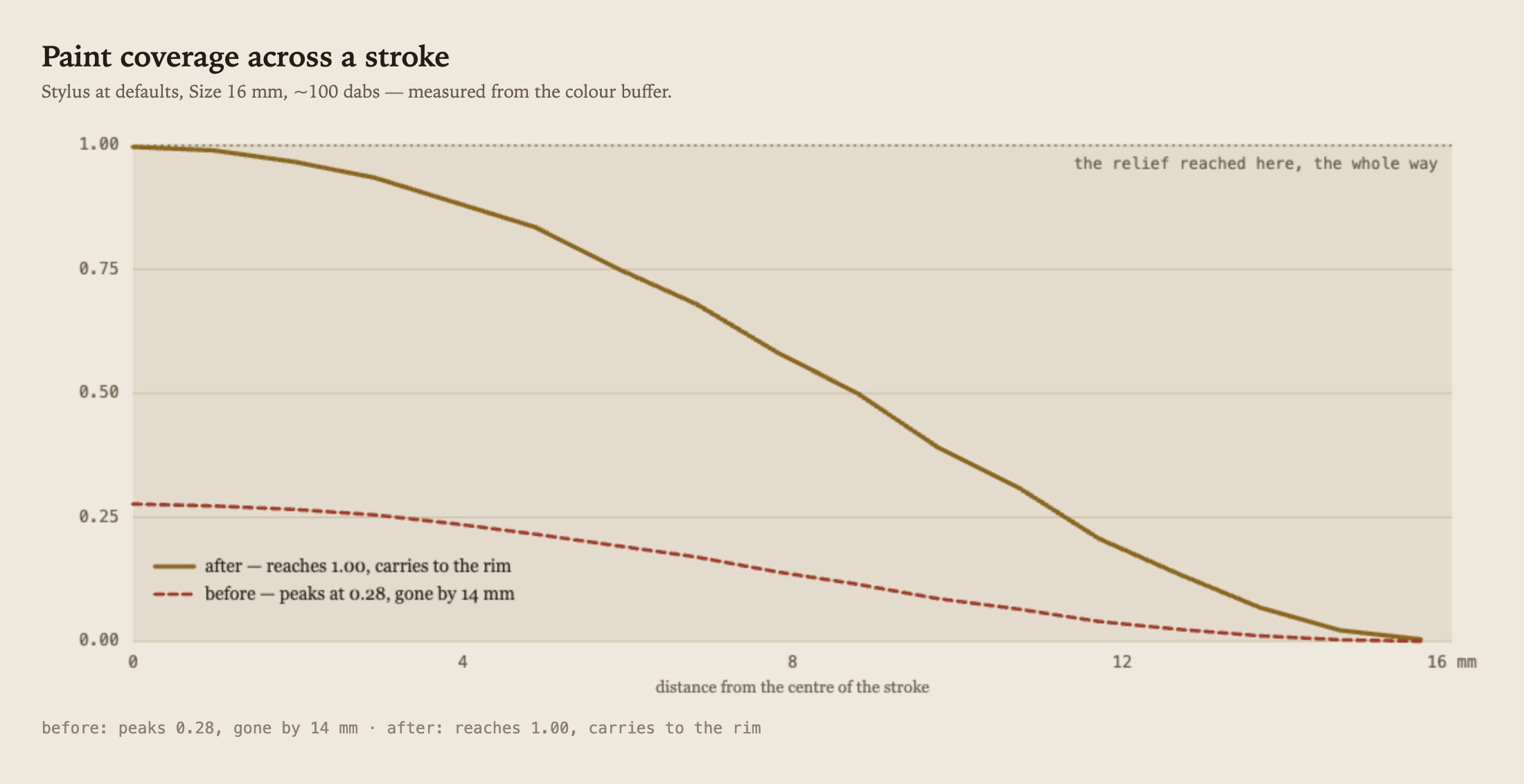
The relief covered the full width the whole time. Only the paint fell short.
And then the viewport threw the fix away. Both display shaders decided what a texel looked like with a bare "is there any paint here" test — a binary one, thresholded at 0.05. Coverage 0.06 and Coverage 1.00 rendered byte-identical — the same rgb(43,80,115) in both cases, measured off the canvas. The wash was correct in the buffer and correct in every export, and completely invisible on the block you were painting. Fixed the same evening in all three surface shaders (face, ortho preview and extrude walls), which now composite the paint over the block's own albedo at its real Coverage. Unpainted clay is bit-identical to before.
Coverage
How solidly a mark covers its own footprint. 1.00 is opaque across the full width of the brush, or the full silhouette of a Stamp or Imprint. Lower it for a wash. It has nothing to do with Height (mm) any more.
The important property: a single stroke lays one consistent film. Set Coverage 0.40, scribble a stroke that crosses itself ten times, and every part of it — crossings included — reads exactly 0.400. Lift the pen and stroke again and it builds properly: 0.40 over 0.40 gives 0.640, and a third pass 0.784.
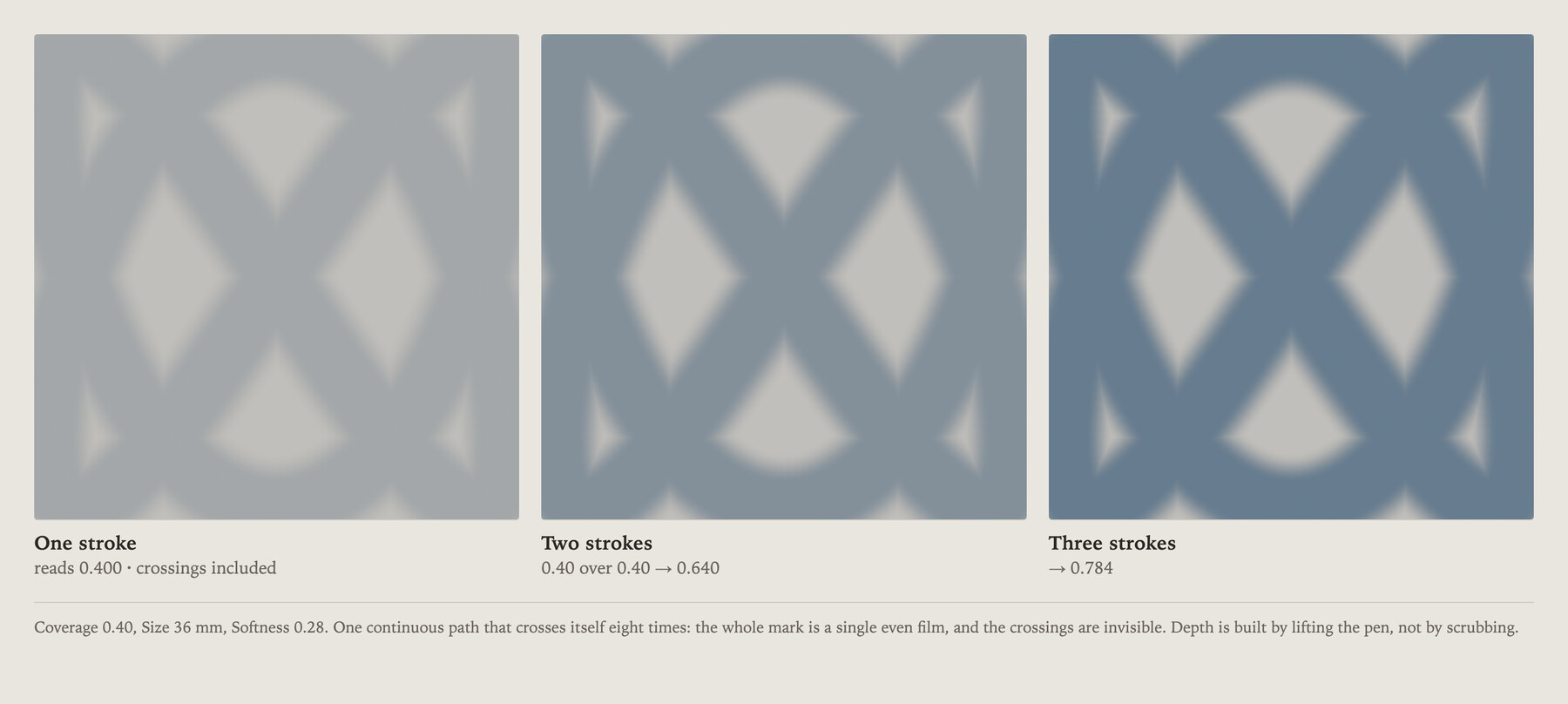
One continuous path crossing itself eight times, at Coverage 0.40. Measured on the arms and at the crossings: 0.400 at every one of them, then 0.640, then 0.784. Transparent glazes are possible — and, since this evening, visible.
Softness (edge)
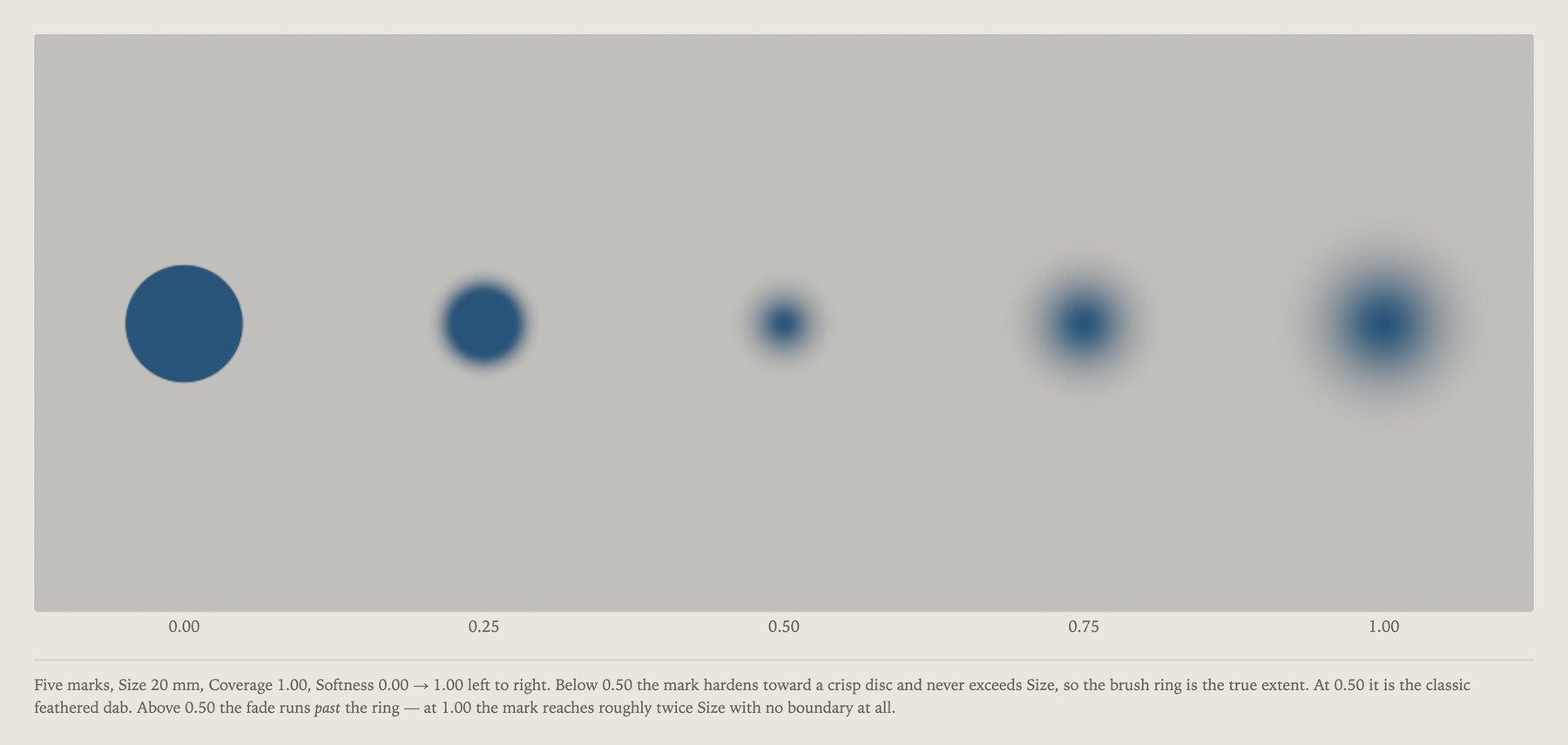
Where the mark stops. Below 0.50 it hardens toward a crisp disc, for clean colour blocking. 0.50 is the classic feathered dab. Above 0.50 — which used to do nothing at all to paint — the fade now runs past the Size radius.
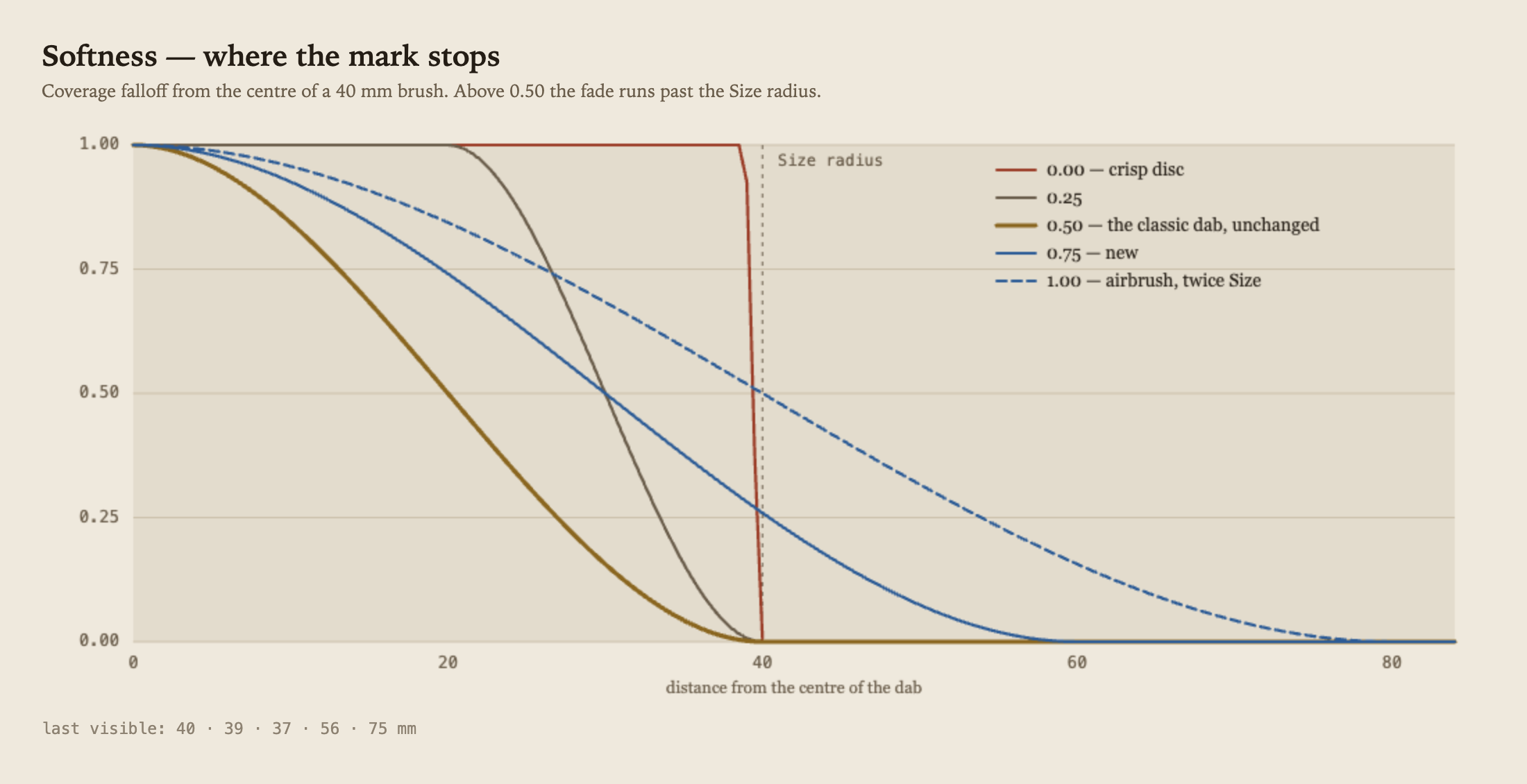
At 1.00 the mark reaches roughly twice Size with no boundary — an airbrushed halo. Below 0.50 it never exceeds Size, so the brush ring is the true extent; above 0.50 the soft tail deliberately overruns the ring. Re-measured on a 40 mm brush: last visible radius 39 · 39 · 38 · 58 · 77 mm across the slider.
Softness lands in three places at once: the shoulders of the sculpt, the edge of the paint, and the feather on a Stamp or Imprint silhouette. Change it for one and you have changed all three.
Flow ↔ Flat
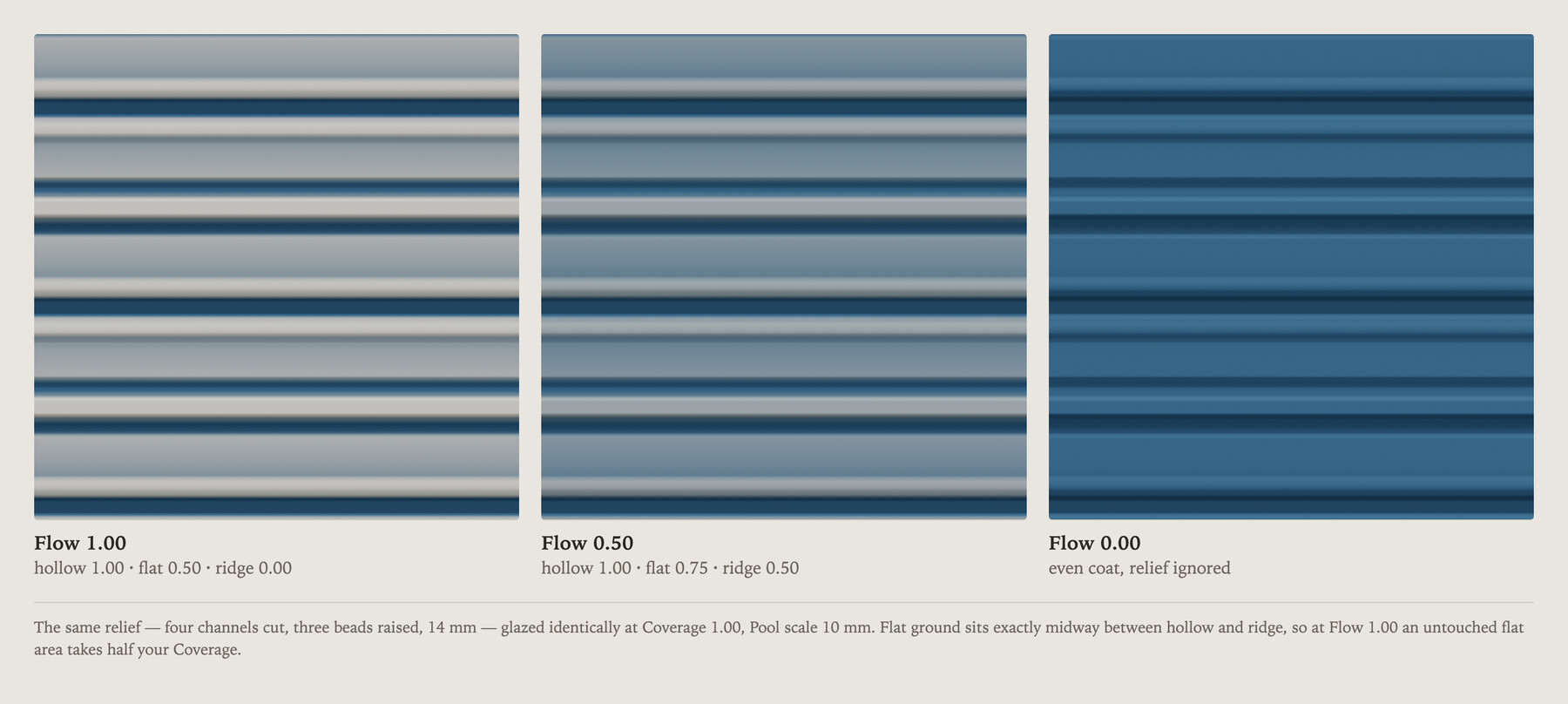
How much the glaze reads the relief. At 1.00 it pools in hollows and thins on ridges; at 0.00 it ignores the relief entirely and lays an even coat at full strength. ALT flips the pooling to catch the ridges instead — a drybrush highlight.
Glaze strength as a fraction of your Coverage, measured on an 8 mm feature cut 9.6 mm deep at Pool scale 10 mm:
| in a hollow | flat ground | on a ridge | |
|---|---|---|---|
| Flow 1.00 | 1.00 | 0.50 | 0.00 |
| Flow 0.50 | 1.00 | 0.75 | 0.50 |
| Flow 0.00 | 1.00 | 1.00 | 1.00 |
Only the middle column is a law. Flat ground sits exactly midway between hollow and ridge, so at Flow 1.00 an untouched flat area takes half your Coverage — that is by construction and never moves. The outer two columns depend on the feature: any hollow or ridge the pooling can actually see saturates all the way to 1.00 and 0.00, and a fainter form lands somewhere between. (An earlier draft of this page printed 0.17 / 0.59 in the ridge column — those are the readings for a ridge too shallow to saturate, not a general figure.)
If a glaze looks weaker than the Coverage you set, the middle column is why — raise Coverage to compensate, or pull Flow down for a solid even coat.
Pool scale
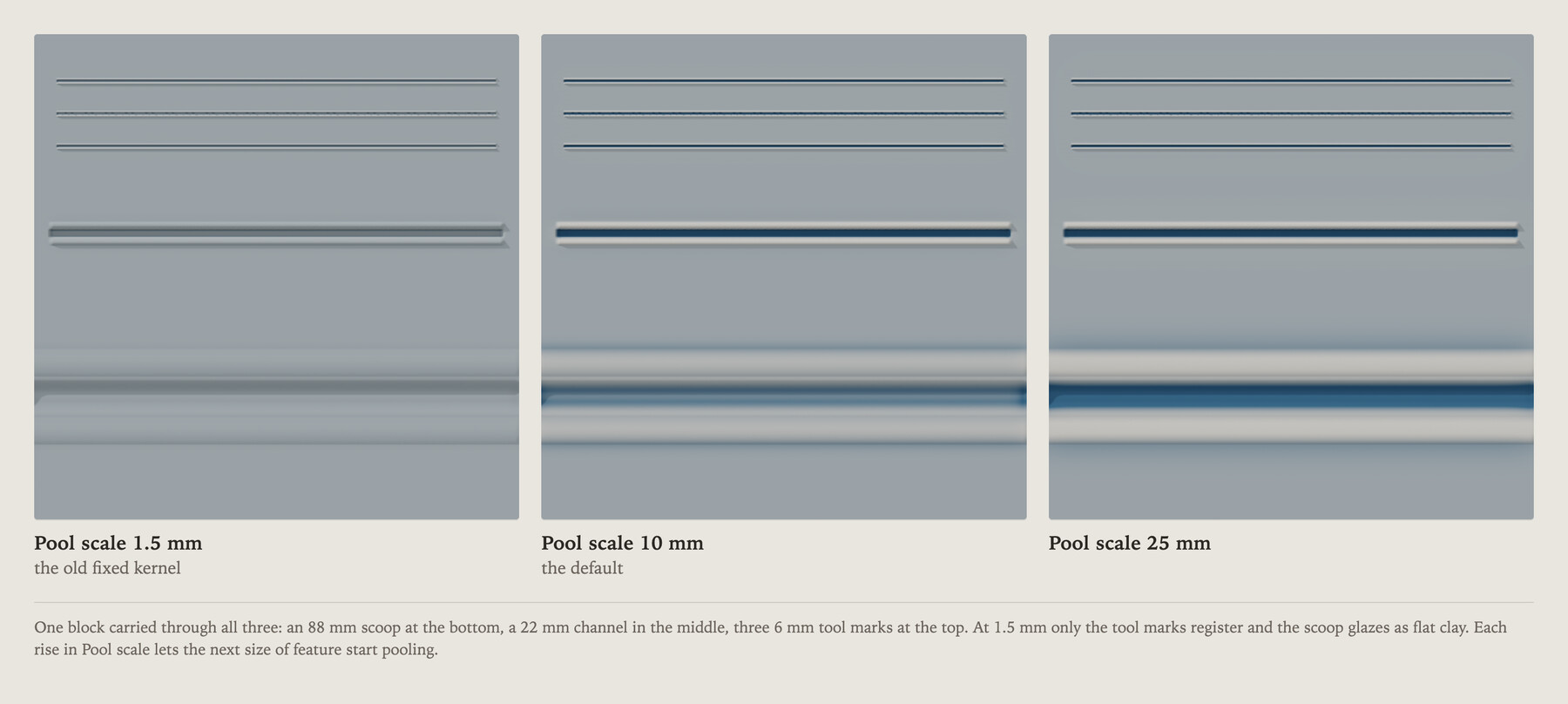
How big a feature counts as a recess. The wash measures each point against its neighbourhood, and this is the radius of that neighbourhood. It used to be fixed at about 1.5 mm, which meant Flow could only ever see fine tool marks — anything wider than 8 mm read as flat clay however deep it was, so "pools in the relief" visibly didn't.
Glaze strength inside a groove — a Stylus channel of the given width, cut at Height 8 mm, glazed at Coverage 1.00 and Flow 1.00, read at the centre of the channel. Flat ground reads 0.50 in every column, so a ringed cell means the glaze cannot tell the groove is there at all:
The 2 mm row is the one to read twice. It looks like the strongest pooling in the left column, but a 2 mm channel asked for 8 mm of depth only reaches 3.7 mm — the brush is narrower than the cut it is trying to make. Every other row cuts 7.2 to 8.0 mm as asked.
Rule of thumb: pooling is full up to roughly the Pool scale, then tapers above it. If a broad scooped form glazes flat, raise Pool scale past its width.
The coupling, and why you will probably never meet it
A crisp carve pools less than a soft one — the opposite of the intuition that sharper carving gives the glaze more to catch.
The mechanism is real. A hard-edged groove has a flat floor, and the middle of a flat floor is flat ground no matter how deep it is. A soft groove curves continuously, so every point on it sits below its own neighbourhood. Measured on a 20 mm Stylus channel cut 8 mm deep, the flat floor is 10 mm wide at Softness 0.0, 6 mm at 0.5, and 2 mm at 1.0 — the carve softness really is deciding how much of the groove has no curvature at all.
But whether that reaches the glaze depends entirely on Pool scale, and at the default it does not:
At the old 1.5 mm kernel the crisp groove was literally indistinguishable from untouched clay and only the rounded one registered at all. At the 10 mm default the coupling is gone — all three read 1.00, and the carve Softness makes no difference to the glaze whatsoever. The Pool scale slider did not merely compensate for this; it removed it.
An earlier draft of this page gave 0.513 / 0.565 / 0.698 for a 5 mm groove and offered them as current behaviour. Those readings belong to the 1.5 mm kernel, and they contradicted this page's own Pool scale table, which lists that same 5 mm groove at 1.00. The honest version: raise Pool scale past a form's width and its walls alone are enough to register it, whatever you carved them with.
Starting points
Transparent glaze over carved detail — Coverage 0.25–0.40 · Flow 1.00 · Pool scale 10 mm · Softness 0.50. Stroke freely; crossing yourself will not darken it. Build depth by lifting the pen between passes.
Solid colour blocking — Coverage 1.00 · Flow 0.00 · Softness 0.00–0.15. Flow at 0 keeps the relief from modulating the colour, so a shape reads as one flat field.
Glaze that sinks into a broad hollow — Coverage 1.00 · Flow 1.00 · Pool scale 25–40 mm. For scooped, sweeping forms.
Airbrushed atmospheric wash — Coverage 0.15 · Softness 0.90–1.00 · Flow 0.30. The new top half of the Softness slider: no boundary at all, good for smoke, bloom and fired-edge effects.
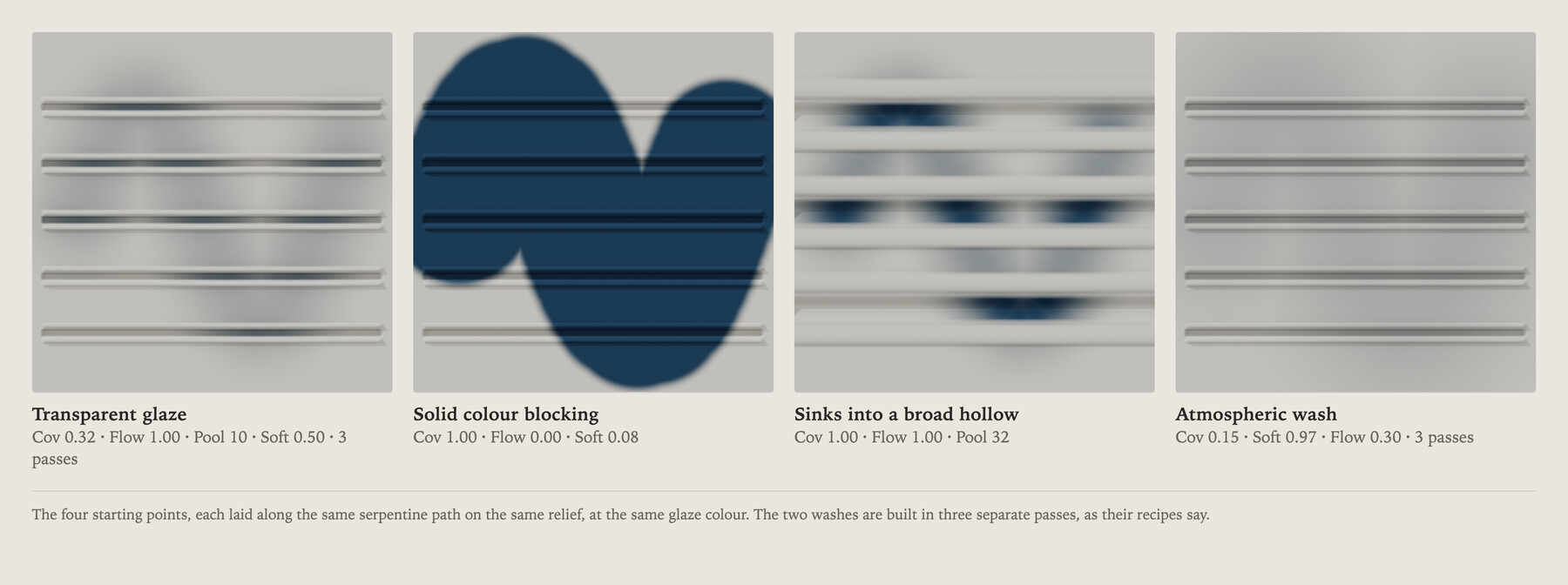
All four laid along the same serpentine path on the same relief, in the same glaze colour. The two washes are built in three passes each, as their recipes say — one pass of a 0.15 veil is very nearly nothing, which is the point of it.
The controls live in the ◐ Material tablet. Coverage sits at the top, above Roughness; Pool scale sits under Flow ↔ Flat.